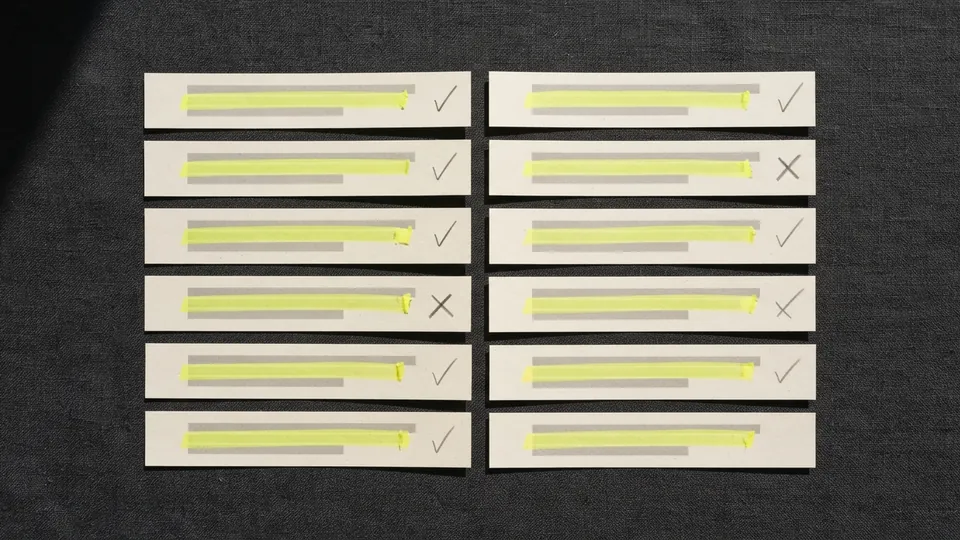
Chat assistants are useful for getting started on a question. They summarise, suggest and explain, and they do it in fluent, confident paragraphs. The trouble is that the confidence is the same whether the content is right or wrong. A good answer and a subtly wrong one look identical on the screen. The only way to tell them apart is to check, and the easiest way to check is to annotate: turn the paragraphs into a list of claims and mark each one with what you found.
The method
Paste the answer into a document you can mark
Copy the answer into a word processor, a notes app or a PDF. Chat windows are poor places to annotate: you cannot highlight, and the text may be regenerated or lost.
Highlight every checkable claim
Mark each statement of fact in yellow: names, dates, numbers, definitions, descriptions of what a law, study or product says. A long answer often contains fifteen or twenty. Leave general advice and opinion unmarked.
Mark citations and quotations separately
Give any cited source, link or quotation its own mark. These are the most likely parts to be invented, and they need opening one by one.
Check each claim against a real source
For each yellow mark, find an independent source that states the same fact: an official page, a reference work, the study itself. Search for the claim, not for the answer. When you find the supporting sentence, make a link to that highlighted sentence and paste it beside the claim.
Record a verdict for each claim
Tick claims you confirmed, cross those a source contradicts, and put a question mark on those you could not confirm. Keep the links next to the ticks and crosses.
Rewrite from the ticks only
Build your own answer, in your own words, from the confirmed claims and their sources. Drop the question marks or state them as open questions.
What most often turns out to be wrong
| Part of the answer | Typical problem | How to check |
|---|---|---|
| Citations and links | A plausible title, author or address that does not exist, or exists and says something else | Open every one and find the passage |
| Quotations | Invented wording or the wrong speaker | Trace it to a primary source |
| Numbers | Figures that are out of date, from a different country, or not found anywhere | Find the original dataset or report and its year |
| Recent events | Information older than the model's training, presented as current | Check a dated news source |
| Specialist details | A correct general picture with one wrong specific, such as a dosage, a deadline or a rule | Check the official source for that field |
For quotations, the full procedure is in tracing a quote back to its source. For the cited documents, the steps in annotating a source to verify its claims apply once you have opened them.
Why annotate rather than ask again
Asking the assistant whether its answer is correct produces another fluent paragraph, not evidence. Asking it for sources can produce more citations to check, which is useful as a lead but not as proof. Annotation moves the question out of the chat window and onto the page, where you can see which claims are confirmed, which are not, and where each confirmation came from. It is slower than trusting the answer, and much faster than finding out later that a key fact was wrong.
A note on style
While you annotate, you will notice the answer's style: the hedging, the balanced lists and the neat summary at the end. These habits are covered in close reading for AI writing patterns. They say nothing about whether a claim is true. Check the facts; do not grade the prose.
For students using chat assistants
If your school allows chat assistants for research, this method is how to use them responsibly: as a list of leads to check, never as a source. Keep your annotated copy with its links. It shows your teacher exactly what you verified and where, and it is the strongest evidence that the final work is yours.
Once you have pasted an answer into a document, the PDF highlight and note tools are a good place to mark it up, and links that land on the supporting sentence are the best way to record what you confirmed. More methods like these are on the guides index. When a chatbot answer ends up in your own work, citing a chatbot answer in APA, MLA or Chicago style covers the citation, and what detector scores do and do not mean explains the other side of the same question.
Common questions
How do you fact check an AI chatbot answer?
Paste it into a document, highlight every checkable claim, open or find an independent source for each, and record whether the source confirms, contradicts or cannot confirm it. Build your final answer only from the confirmed claims.
Are chatbot citations reliable?
Not on their own. They can be accurate, misdescribed or invented, so open every citation and find the passage before relying on it.
Why not just ask the chatbot if it is right?
Its reply is another generated answer, not evidence. Checking claims against independent sources is the only way to confirm them.
What should I save when I check an answer?
The annotated answer and, for each confirmed claim, a link to the exact supporting sentence in the source.
Sources
- Caulfield, M. (2019). SIFT (The Four Moves). Hapgood
- Wineburg, S. and McGrew, S. (2017). Lateral Reading: Reading Less and Learning More When Evaluating Digital Information. Stanford Digital Repository
- Association of College and Research Libraries: Framework for Information Literacy for Higher Education
- Min, S. et al. (2023). FActScore: Fine-grained Atomic Evaluation of Factual Precision in Long Form Text Generation. EMNLP 2023